

// use cases
Red-team your agent against OWASP and MITRE ATLAS
Configure recurring Agent Red Teaming runs with mandatory OWASP LLM Top 10, OWASP Agentic Top 10, and MITRE ATLAS coverage.
Run recurring adversarial tests against a deployed AI agent. Superagent discovers what the agent can do, maps applicable attack techniques, exercises the exposed boundaries, and records verified findings with framework mappings and evidence.
Every run covers the complete current OWASP LLM Top 10 and OWASP Agentic Top 10, applicable MITRE ATLAS techniques, and applicable AIUC-1 requirements.
Prerequisites
- A deployed AI agent available through a public application or API
- Dedicated test credentials or scoped authentication headers
- A Superagent organization
- An HTTPS endpoint for Red Teaming lifecycle and finding events
1. Create the Agent
- Open Agents → Connected.
- Select Add new.
- Enter a name and choose the matching agent type, such as chatbot, voice agent, coding agent, AI workflow, or data pipeline.
- Create the Agent and open its detail page.
The persistent Agent keeps the target configuration, schedule, run history, findings, and webhook source identity together.
2. Configure Red Teaming settings
Enable Red teaming, then open Settings on the Agent detail page.
- Choose Application when the agent is reached through a browser, or API when it is reached through HTTP or WebSocket.
- Enter the public target URL.
- Add dedicated test credentials for an application target.
- Add encrypted headers for authentication, tenant selection, or a staging access gate.
- Set a request throttle that the target can safely handle.
- Add a specific prompt when the run needs extra target or protocol context.
- Save the settings.
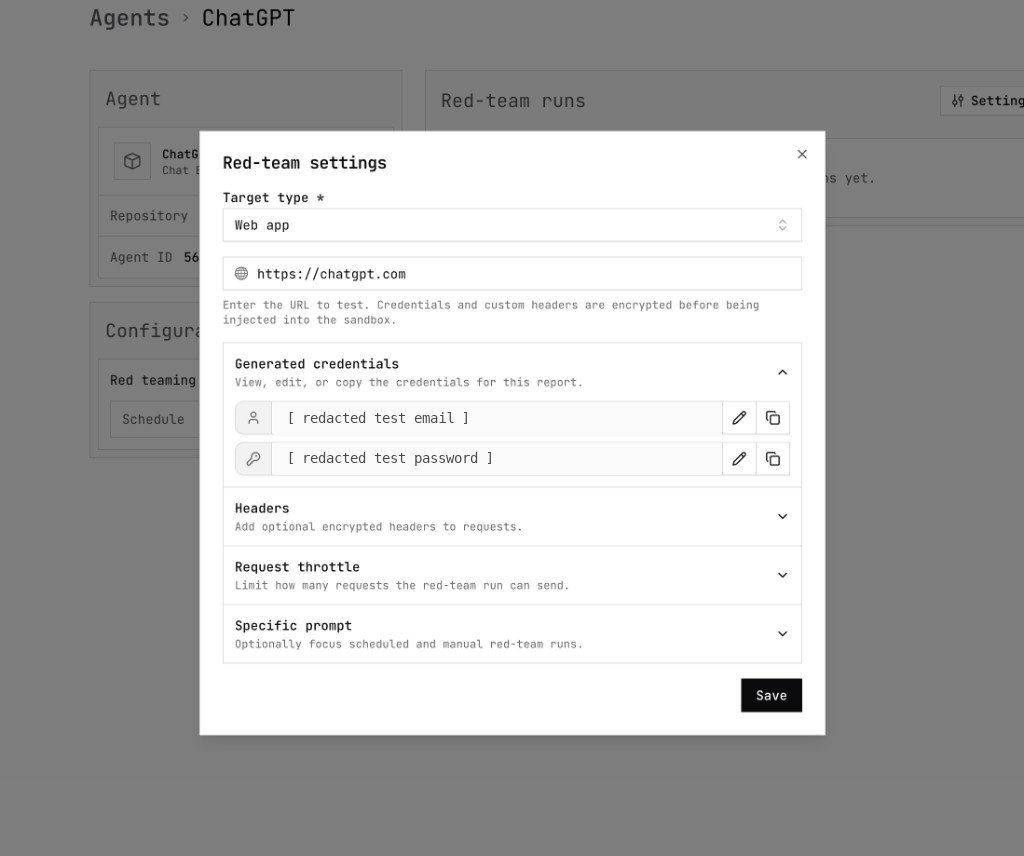
For an API target, use the specific prompt to describe the HTTP method, request body, prompt location, authentication requirements, and response or streaming shape. Credentials, headers, and API request configuration are encrypted and excluded from webhook payloads.
3. Set the schedule
Choose how often the Agent should be tested:
- Daily for frequently changing production agents
- Weekly for normal release cycles
- Monthly for slower-moving or higher-cost targets
Select New run once before relying on the schedule. Confirm that the target is reachable, authentication works, the request throttle is appropriate, and the agent can exercise its intended capabilities.
Scheduled, manual, and API-triggered runs appear together on the Agent detail page.
4. Cover OWASP and MITRE ATLAS
The Red Teaming runner researches the current authoritative framework versions before selecting attacks. It builds and dispositions a coverage matrix across:
- OWASP LLM Top 10 — prompt injection, sensitive information disclosure, supply chain risks, data and model poisoning, improper output handling, excessive agency, system prompt leakage, vector and embedding weaknesses, misinformation, and unbounded consumption
- OWASP Agentic Top 10 — goal hijacking, tool misuse, identity and privilege abuse, agentic supply chain attacks, unexpected code execution, memory and context poisoning, insecure inter-agent communication, cascading failures, human-agent trust exploitation, and rogue agents
- MITRE ATLAS — Generative AI and Agentic AI techniques that apply to the discovered target capabilities
- AIUC-1 — applicable controls across data and privacy, security, safety, reliability, accountability, and society
Use Specific prompt to add target-specific priorities without replacing the mandatory framework coverage. For example:
5. Send runs and findings to your workflow
Open Webhooks and create a target:
- Enter the HTTPS endpoint for the security workflow.
- Subscribe to
report.startedandreport.finished. - Subscribe to
finding.createdandfinding.triage_completedwhen the workflow also acts on individual findings. - Open Sources, expand Agents, and select the exact Agent.
- Save the webhook, copy its signing secret, and send a test event.
The exact Agent source prevents runs and findings from unrelated targets from
reaching this workflow. report.finished includes the run outcome and
dashboard URL. Agent report payloads include the target and run configuration
needed for routing, but exclude credentials, target headers, API request
bodies, and sandbox details.
Verify every webhook signature, deduplicate by event ID, acknowledge quickly, and perform longer review or remediation work asynchronously.
6. Review the run
Open the completed run from the Agent detail page or the report.finished
webhook:
- Review the live runner log and final status.
- Inspect browser recordings and screenshots for application targets.
- Review findings, evidence, risk, and framework mappings.
- Confirm that required framework items were tested, marked not applicable with reasoning, or recorded as blocked.
- Route verified findings through the normal triage and remediation process.