

// use cases
Build an always-on pentester with Cursor
Schedule repository Red Teaming runs and send newly created findings from one repository to Cursor for reviewed remediation.
Build an always on security loop for a repository. Superagent tests the repository on a schedule and sends newly created findings from that exact Repository to Cursor. Cursor investigates each finding, reproduces qualifying exploit paths, prepares tested fixes, and leaves every pull request for CI and human review.
Prerequisites
- A repository connected through the Superagent Security GitHub App
- A Cursor Automation connected to the repository
- A Superagent organization API key available to Cursor as
SUPERAGENT_API_KEY - A repository reviewer for every proposed change
1. Schedule repository Red Teaming runs
- Connect GitHub and give the Superagent Security app access to the repository.
- Open Repository and select the repository Cursor will patch.
- Enable Red teaming in the repository settings.
- Choose a trigger: every release or prerelease, release tags, daily, weekly, or monthly.
- Add a repository specific goal prompt when the campaign needs a narrower scope.
- Select New run once to confirm the repository access and goal before relying on the trigger.
Superagent clones the repository into an isolated sandbox and runs each campaign with the source as context. Prime independently verifies candidates before creating findings. Findings include the evidence and reproduction context Cursor needs to decide whether remediation is justified.
2. Connect Cursor to Superagent MCP
Add the Superagent server to Cursor's mcp.json:
{
  "mcpServers": {
    "superagent": {
      "url": "https://www.superagent.sh/mcp",
      "headers": {
        "Authorization": "Bearer ${env:SUPERAGENT_API_KEY}"
      }
    }
  }
}
Set SUPERAGENT_API_KEY in the environment that launches Cursor. Do not put
the key in chat, source control, or the MCP URL. See
Set up Cursor for the complete connection test.
3. Create the Cursor Automation
Create a Cursor Automation with:
- The selected repository as its working repository
- A webhook trigger
- Superagent MCP enabled
- Permission to create branches, run tests, and open pull requests
- No permission to merge or deploy without the normal review controls
Copy the webhook URL and the authentication value generated by Cursor. You will store the authentication value as an encrypted Superagent webhook header.
4. Route findings from this Repository
Open Webhooks in Superagent and create a target:
- Use the Cursor Automation webhook URL as the destination.
- Add Cursor's authentication value as an
Authorizationcustom header. - Subscribe to
finding.created. - Open Sources, expand Repositories, and select the exact repository you configured above.
- Save the target and send a test event.
The finding.created event starts the automation when a finding is created,
without waiting for automated triage. Triage fields can still be empty or
pending; Cursor should retrieve the latest finding through MCP and apply its
own remediation gate. Use the singular event name finding.created, not
findings.created.
Selecting the exact repository prevents findings from unrelated targets from starting this automation. Select All Repositories only when the same automation intentionally owns every current and future repository.
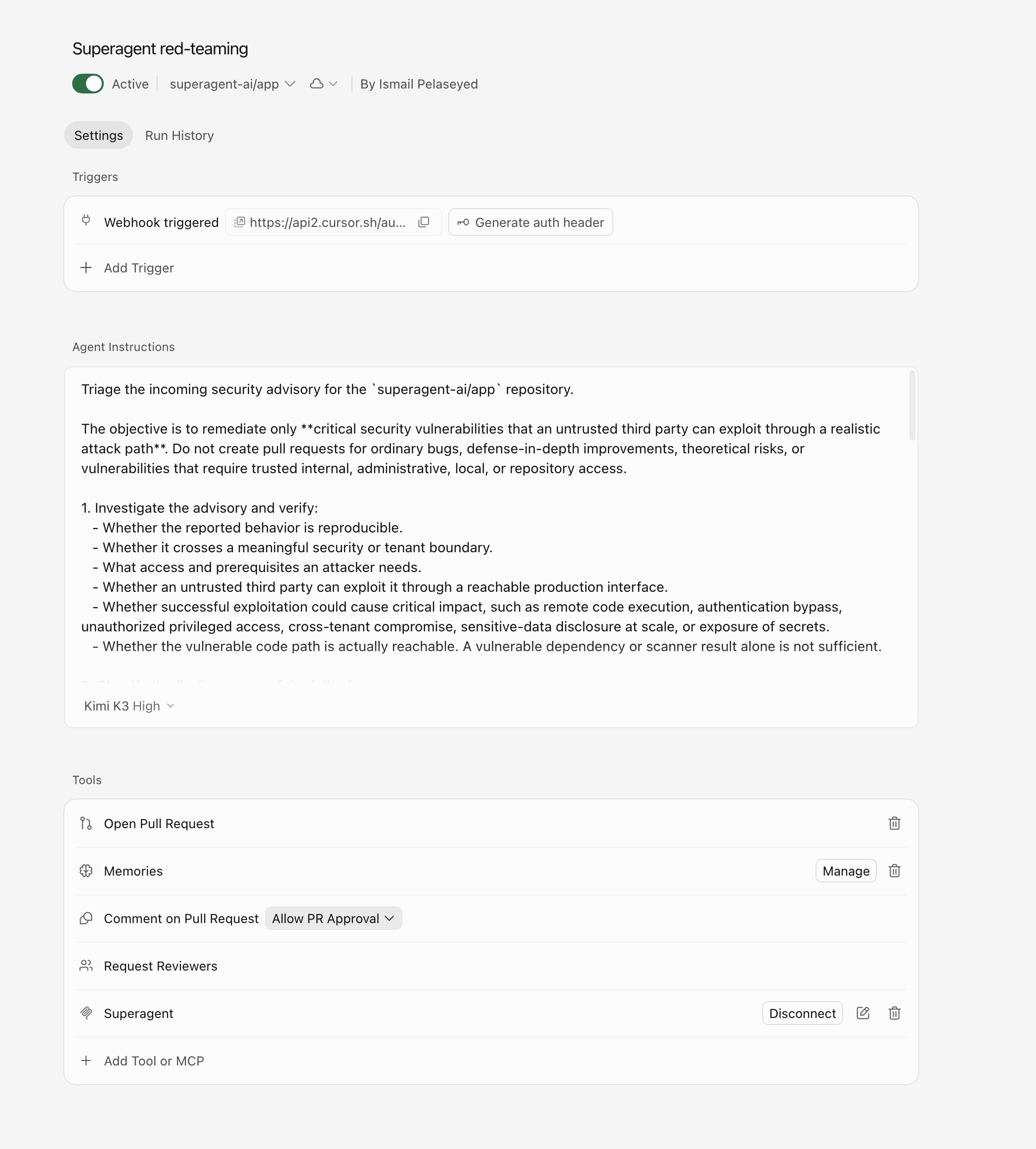
5. Give Cursor a strict remediation gate
Use instructions like these in the Cursor Automation:
The connected MCP server exposes the current structured report operation and schema. Use that schema instead of inventing report fields in the automation prompt.
6. Verify the complete loop
- Confirm the webhook test starts exactly one Cursor Automation.
- Start a manual repository Red Teaming run.
- Review the report and confirm it creates a new finding.
- Confirm the repository's
finding.createdevent starts the Cursor Automation without requiring automated triage to finish. - Confirm Cursor retrieves the finding through MCP and applies the remediation gate.
- Verify that a qualifying issue produces a tested pull request, while a weak or unreachable issue produces only a structured disposition.
- Require CI and human review before merge.